
종속성 추가
프로젝트에서 추가 기능을 제공하기 위해 타사 라이브러리에 의존하는 것이 일반적입니다. 이렇게 하려면 다음 명령을 실행하여 프로젝트를 가장 잘 편집할 수 있도록 하세요:
bash
tuist edit프로젝트 파일이 포함된 Xcode 프로젝트가 열립니다. Package.swift 파일을 편집하고
swift
// swift-tools-version: 5.9
import PackageDescription

#if TUIST
    import ProjectDescription

    let packageSettings = PackageSettings(
        // Customize the product types for specific package product
        // Default is .staticFramework
        // productTypes: ["Alamofire": .framework,]
        productTypes: [:]
    )
#endif

let package = Package(
    name: "MyApp",
    dependencies: [
        // Add your own dependencies here:
        // .package(url: "https://github.com/Alamofire/Alamofire", from: "5.0.0"),
        // You can read more about dependencies here: https://docs.tuist.io/documentation/tuist/dependencies
        .package(url: "https://github.com/onevcat/Kingfisher", .upToNextMajor(from: "7.12.0"))
    ]
)
그런 다음 프로젝트에서 애플리케이션 대상을 편집하여 Kingfisher 을 종속성으로 선언합니다:
swift
import ProjectDescription

let project = Project(
    name: "MyApp",
    targets: [
        .target(
            name: "MyApp",
            destinations: .iOS,
            product: .app,
            bundleId: "dev.tuist.MyApp",
            infoPlist: .extendingDefault(
                with: [
                    "UILaunchStoryboardName": "LaunchScreen.storyboard",
                ]
            ),
            buildableFolders: [
                "MyApp/Sources",
                "MyApp/Resources",
            ],
            dependencies: [
                .external(name: "Kingfisher")
            ]
        ),
        .target(
            name: "MyAppTests",
            destinations: .iOS,
            product: .unitTests,
            bundleId: "dev.tuist.MyAppTests",
            infoPlist: .default,
            sources: ["MyApp/Tests/**"],
            resources: [],
            dependencies: [.target(name: "MyApp")]
        ),
    ]
)
그런 다음 tuist install 을 실행하여 Swift 패키지 관리자를 사용하여 종속성을 해결하고 가져옵니다.
SPM AS A DEPENDENCY RESOLVER
종속성에 대한 Tuist의 권장 접근 방식은 종속성을 해결할 때만 Swift 패키지 관리자(SPM)를 사용합니다. 그런 다음 Tuist는 이를 Xcode 프로젝트와 타깃으로 변환하여 구성 가능성과 제어를 극대화합니다.
프로젝트 시각화
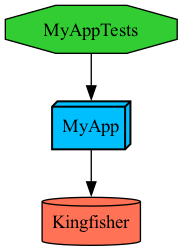
실행하여 프로젝트 구조를 시각화할 수 있습니다:
bash
tuist graph이 명령은 프로젝트 디렉토리에 graph.png 파일을 출력하고 엽니다:
종속성 사용
tuist generate 을 실행하여 Xcode에서 프로젝트를 열고 ContentView.swift 파일을 다음과 같이 변경합니다:
swift
import SwiftUI
import Kingfisher

public struct ContentView: View {
    public init() {}

    public var body: some View {
        Text("Hello, World!")
            .padding()
        KFImage(URL(string: "https://cloud.tuist.io/images/[email protected]")!)
    }
}


struct ContentView_Previews: PreviewProvider {
    static var previews: some View {
        ContentView()
    }
}
Xcode에서 앱을 실행하면 URL에서 이미지가 로드되는 것을 볼 수 있습니다.